
Download Comsensei – AI Domain Name Generator, Free & Secure Tool
Overview of Comsensei
Comsensei is a cloud‑based, AI‑driven domain name generator designed to turn a brief business description into a curated list of brand‑ready, SEO‑friendly domain suggestions. In an era where a memorable URL can dramatically influence click‑through rates and search rankings, the tool removes the guesswork that traditionally plagues early‑stage branding. By leveraging natural language processing, Comsensei interprets the semantic intent behind your input—whether you describe a fintech startup, a health‑focused blog, or a niche e‑commerce store—and then matches that intent with millions of available domain permutations across popular top‑level domains (TLDs). The result is a ranked shortlist that highlights relevance, brevity, and immediate registration possibilities.
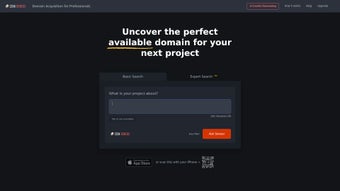
The platform is built with privacy and speed in mind. All user input is processed in‑memory, never stored on permanent servers, and communication is secured via HTTPS with strict GDPR compliance. Real‑time availability checks are performed against major registrars, ensuring that every suggestion you see can be claimed with a single click. The interface is intentionally minimalistic: a clean text box for your description, a few toggle switches for filter preferences, and an instant results pane that displays availability status, SEO score, and an export option.
Comsensei caters to a wide audience—from solo entrepreneurs who need a quick brand name, to agency teams that require bulk brainstorming and collaboration tools. The free tier allows up to ten suggestions per day, which is ample for occasional users, while the premium subscription unlocks unlimited queries, bulk CSV export, and API access for developers who wish to embed domain generation into custom workflows. By focusing on relevance, security, and ease of use, Comsensei positions itself as an essential utility for anyone looking to secure a compelling online identity without spending hours on manual research.
Key Features That Power the Naming Process
- AI‑Driven Contextual Generation: Utilises deep‑learning language models to understand your description and produce domain ideas that reflect tone, industry, and target audience.
- Instant Real‑Time Availability: Each suggestion is cross‑checked with leading registrars (GoDaddy, Namecheap, Google Domains) at the moment it appears, removing the need for separate lookup tools.
- Multi‑Extension Library: Supports classic extensions (.com, .net, .org) as well as modern TLDs such as .io, .app, .tech, .dev, and emerging niche extensions.
- SEO Keyword Highlighting: Automatically emphasizes high‑impact keywords within suggestions, helping you choose names that boost organic visibility.
- Advanced Filtering Options: Toggle filters for length (short vs. long), memorability, brandability, phonetic similarity, and keyword density.
- One‑Click Export & Sharing: Export shortlisted names to CSV, copy to clipboard, or share via email/social links for team collaboration.
- Privacy‑First Architecture: No personal data is retained; the description is processed only during the active session and discarded afterwards.
- Continuous Model Updates: The AI engine is refreshed weekly with new domain trends, emerging slang, and evolving industry vocabularies.
- Responsive, Device‑Agnostic UI: Optimised for desktop, tablet, and mobile browsers, ensuring a smooth experience on any screen size.
- Scalable Pricing Model: Free tier (10 suggestions/day) for casual users, plus tiered premium plans starting at $9.99/month for unlimited queries, bulk export, and API access.
Getting Started: Installation, Usage Steps & Compatibility
Because Comsensei is a SaaS solution, there is nothing to download or install on your local machine. To begin, navigate to the official website and create a free account using an email address or a Google single‑sign‑on. The onboarding wizard walks you through three simple steps:
- Enter Your Business Description: Write a concise paragraph (50‑150 words) that outlines your product or service, target market, and desired brand tone (e.g., professional, playful, tech‑savvy).
- Select Preferences: Choose filters such as desired TLDs, maximum length, and whether you prefer keyword‑rich or brand‑able names.
- Generate & Review Results: Click “Generate” and watch as the AI produces a ranked list, each entry displaying availability, SEO score, and a quick “Register” button.
The platform runs entirely in modern browsers using HTML5, CSS3, and JavaScript, which means it works on any operating system that supports a recent browser version. Supported OS environments include:
- Windows 10/11 (Edge, Chrome, Firefox)
- macOS Monterey and later (Safari, Chrome, Firefox)
- Linux distributions with up‑to‑date browsers
- Android 8+ (Chrome, Firefox)
- iOS 13+ (Safari, Chrome)
For power users, Comsensei offers a RESTful API (available on premium plans) that can be called from custom scripts, CI pipelines, or CMS plugins. The API returns JSON‑formatted domain suggestions, availability flags, and SEO metrics, enabling seamless integration into existing branding workflows.
Security is baked into every step. All traffic is encrypted with TLS 1.3, and the service adheres to GDPR principles: no personal data is stored beyond the active session, and users can delete their account and associated history at any time. The “Register” button redirects you to the chosen registrar with the domain pre‑filled, cutting the registration process down to a single click and ensuring that the name you like remains yours.
Pros, Cons, Frequently Asked Questions & Final Verdict
Pros
- AI‑generated domain ideas that reflect your brand’s tone and industry.
- Live availability checks across a wide range of popular TLDs.
- Free tier sufficient for occasional brainstorming; premium unlocks unlimited use.
- Responsive design works flawlessly on desktop, tablet, and mobile devices.
- Privacy‑first processing; no data is retained after the session ends.
- Weekly AI model updates keep suggestions fresh and trend‑aware.
- Export and sharing tools streamline collaboration with teammates or clients.
Cons
- Free version limits daily suggestions to ten, which may feel restrictive for heavy users.
- Advanced filters such as phonetic similarity and bulk API calls require a paid subscription.
- Country‑code TLDs (.us, .uk, .de) are not yet supported in the free tier.
- While the UI is intuitive, users unfamiliar with AI terminology may need a brief learning curve.
Frequently Asked Questions
Is there a completely free version of Comsensei?
Yes. The free tier provides up to ten domain suggestions per day with all core features, making it ideal for occasional entrepreneurs or hobbyists.
Can I use Comsensei on a mobile device?
Absolutely. The responsive web app works on Android and iOS browsers, offering the same AI generation and availability checks as the desktop version.
How does the tool ensure the domains are SEO‑friendly?
Comsensei analyzes keyword relevance, length, and memorability, then assigns an SEO score based on search‑engine best practices. High‑scoring suggestions include target keywords and avoid hyphens or numbers that could dilute ranking potential.
What happens to the description I type into the tool?
Your description is processed in‑memory during the session and is never stored on permanent servers. This design complies with GDPR and protects your intellectual property.
Is there an API for developers who want to integrate domain generation into their apps?
Yes. Premium subscribers receive an API key that provides REST endpoints for generating domain suggestions programmatically, enabling seamless integration with CMS platforms, marketing automation tools, or custom dashboards.
Overall, Comsensei delivers a fast, secure, and intelligent solution for anyone looking to claim a memorable domain without the endless cycle of manual brainstorming and availability checks. Its AI engine, combined with real‑time registrar integration, makes the naming process almost effortless. Whether you’re launching a new startup, rebranding an existing site, or simply exploring creative name ideas, Comsensei gives you the tools to act quickly and confidently.



.png)



